Microsoft drew a line in the sand with Windows 10, presenting an operating system designed for both PCs and tablets alike. The move fostered hardware designers to go all in on convertibles — devices that performed double duty as laptops or slates, with adjustable keyboards to match.
For most of its history, the iPad has taken the opposite approach. Even as Apple has blurred the line between iOS and macOS with offerings like Project Catalyst, the tablet that redefined the category has been mobile first, running a scaled up version of the iPhone operating system. It’s largely suited the company and the product well, offering a dead simple approach for consumers.
But as the iPad has matured, so too have customer expectations. In recent years, Apple’s happily positioned the product as a kind of laptop alternative for business and education. The push has been accelerated with the arrival of the iPad Pro and Apple Pencil, which has made it a more compelling offering for creative pros, along with additional features to help facilitate multitasking.
The arrival of iPadOS marks the next key step in the tablet’s evolution. The device has already received a number of features designed specifically for its larger form factor and computing power, but the rebranding is the company’s way of asserting that the forked operating system is coming into its own, with a slew of features designed specifically to cater to its growing position as a productivity device.
In future iterations, iPadOS will be getting most or all of iOS’s updates at the same time as the iPhone OS. This time out, that includes iOS 13’s Dark Mode, the maps update and redesigned Photos for starters. But as the first iteration of the new rebrand, iPadOS is getting a number of new or updated pieces specific to the tablet.
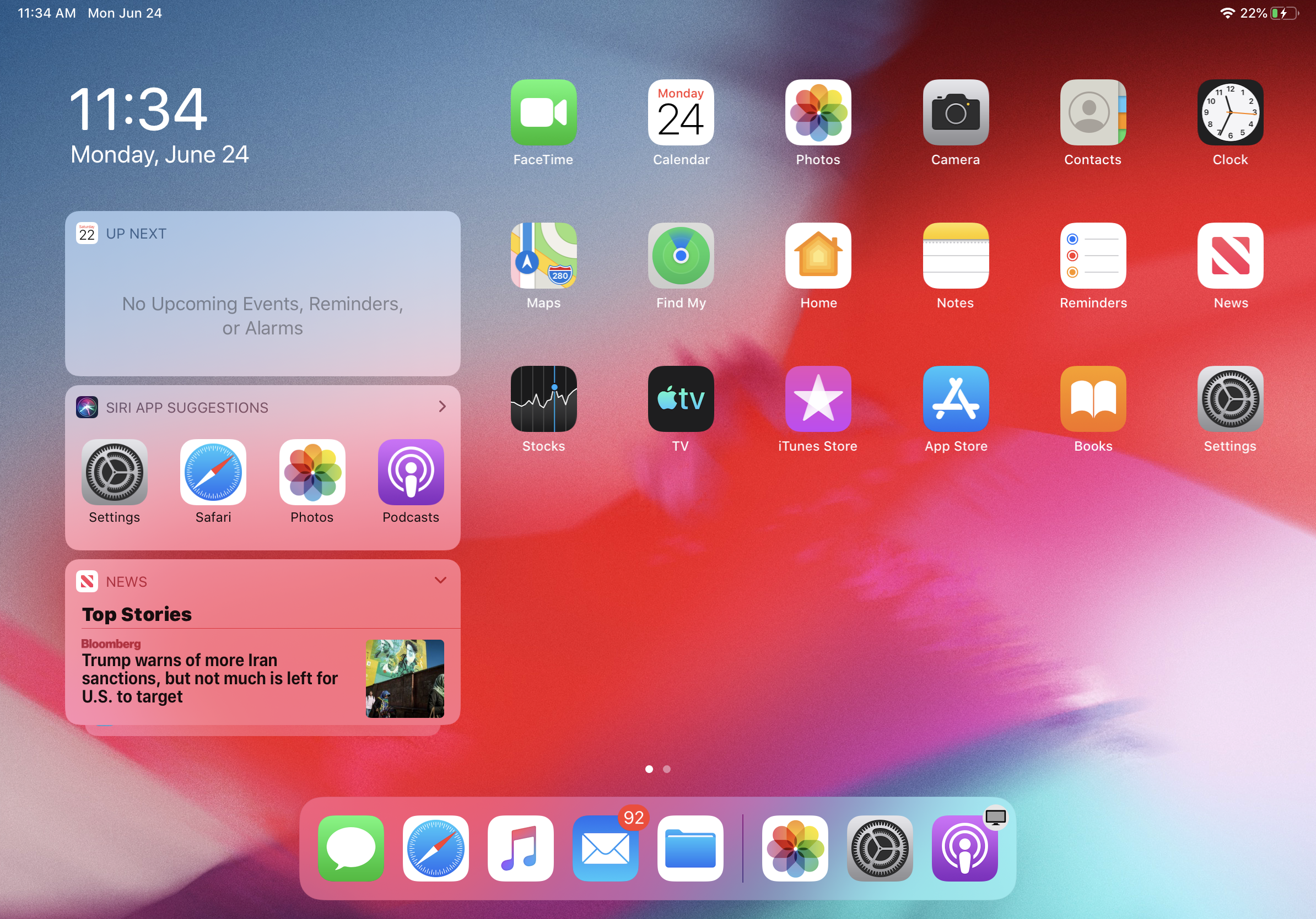
The update starts with Home Screen. Like many of the features on board, the refreshed home screen is all about fitting more into the extended real estate, rather than just making a larger version of the existing layout, as iOS has done in the past. That includes fitting more icons on the screen — 30 in all (plus whatever you’ve got in the dock), segmented into six by five.
Swiping right will bring up a river widget on the left side, just under the newly pinned date and time in the upper left corner. The widget features quick glance features like calendar appointments, weather and photos. Swipe all the way down for settings and you can permanently pin it to the home screen, if you so desire.
Multitasking, on the other hand, is the real centerpiece of the update. Slide Over, which offers a a second floating app window gets some key improvements, including the ability to have several different apps open in the mode at once by dragging them from the dock. Swiping up to the middle of the screen will display all of the apps open in slide over like a deck of cards. Swipe all the way up and the app will go full screen.
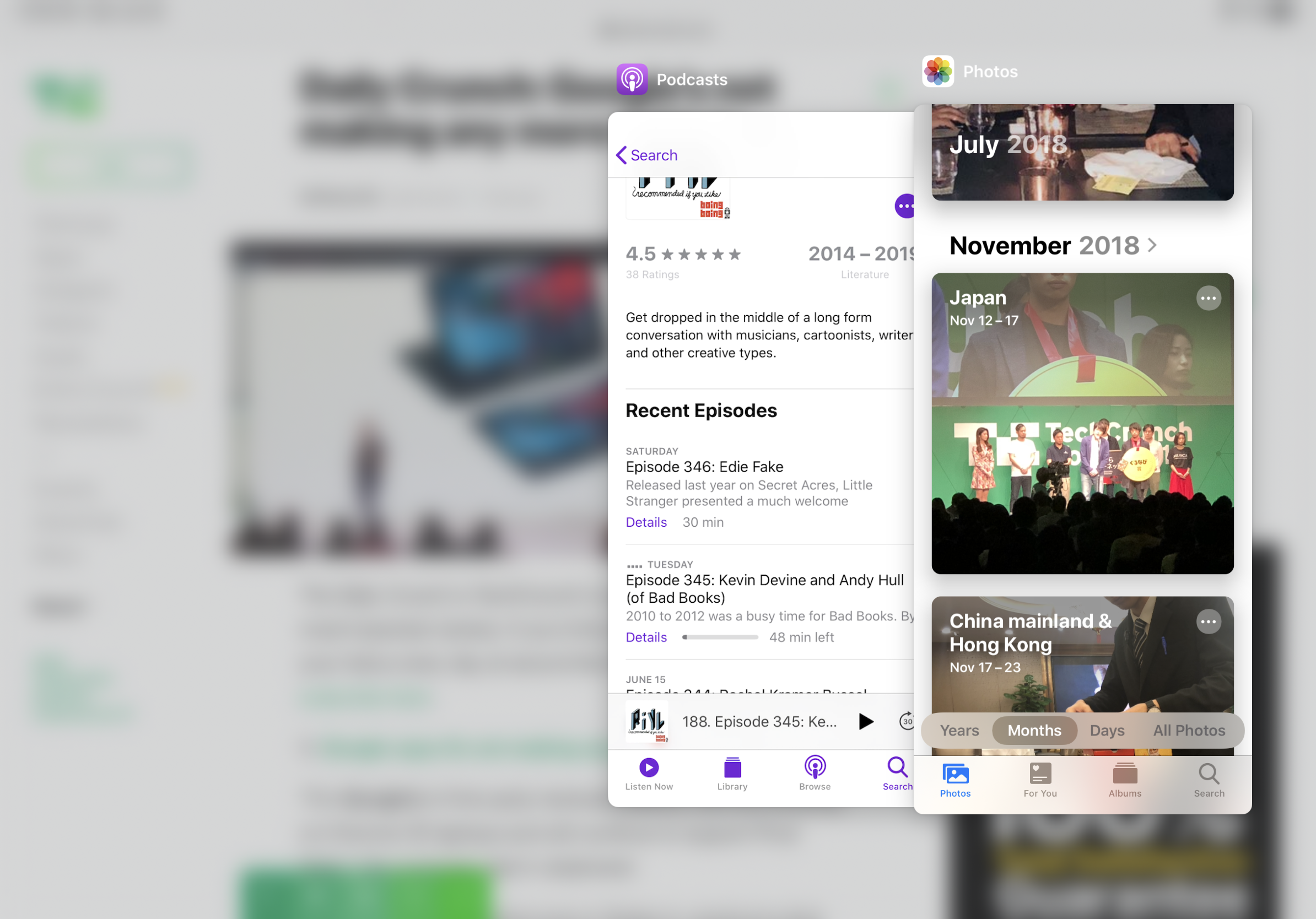
Also of note is the ability to open multiple windows for a single app. It’s something, like much of this multitasking stuff, that we tend to take for granted on the desktop. It’s partially useful, however, for certain applications like Pages, where you tend to utilize notes from one document for writing in another.
There is, perhaps, no clear sign that the company is attempting to offer a more desktop like experience here than the updates to files. The changes are about giving users more control over the file systems on their device — it’s something the company has tended to hide away from the end user, ostensibly to give a simpler experience. Doing that, however, obfuscates interactions, something that ought to be a lot clearer if the iPad is designed to be a more professional machine.
The list includes the ability to plug in external hard drives via the USB C port, which will save a lot of additional dragging and dropping. Those mounted drives will populate the Locations column in the files app. Files can also be imported straight from SD cards and cameras into apps like Lightroom. Also worth noting are the ability to zip and unzip folders inside of the Files app and the addition of a download folder, offering more direct access to content downloaded via Mail, Safari and the like.
The iPadOS public beta is available today, along with iOS 13 and macOS Catalina. The final version is set to arrive in the fall.


from TechCrunch https://tcrn.ch/31VgRci
via IFTTT
Comments
Post a Comment