Instagram is at last quenching the thirst of its thirsty, thirsty unverified users.
The company just introduced a trio of new features designed to make Instagram a generally safer and more authentic place to hang out (third-party 2FA — enable it!) and for the first time the platform now offers users a straightforward way to request verification.
On Instagram, blue check marks are fairly rare, even among pretty big brands and public figures. Getting verified on the platform has long been the stuff of legend — no one quite knows what goes on behind the scenes but knowing a guy doesn’t hurt. Remarkably, there’s even a super sketchy black market where people charge thousands of bucks to hook you up with verified status (or more likely to just rip you off). The whole thing has always been kind of mysterious, with little blue checks quietly sprinkled around in no discernible pattern.
It looks like those days are over. While it’s too early to tell if Instagram will be handing out more verified badges to users, they’ve at least made the process much more transparent. Now, any user can request to be verified with a few steps. As a note: In our testing, the option to request verification is live now in iOS but hasn’t yet popped up in the updated Android app.
If you’re curious if you might qualify to begin with, here’s how Instagram framed the new verification system in its latest announcement:
“… The blue verified badge is an important way for you to know that the account you are interacting with is the authentic presence of a notable public figure, celebrity, global brand or entity. Today we are enabling a new way for accounts that reach large audiences and meet our criteria to request verification through a form within the Instagram app.”
Does that sound like you? Here’s what you need to do.
1) Request Verification
From your profile, navigate to the Settings menu and then find an option to “Request Verification.”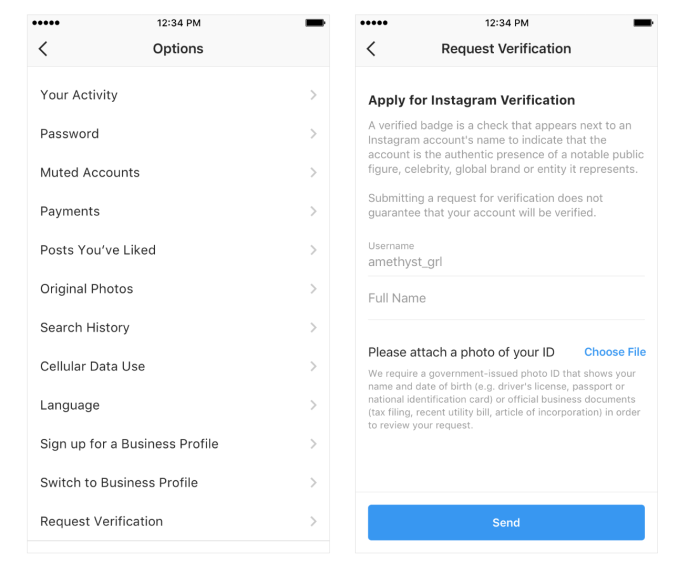 2) Show your stuff
Provide the relevant documents. Instagram accepts government-issued IDs (driver’s license, passport or other national ID cards). In lieu of that, you can submit official documents like a utility bill, tax filing, or article of incorporation. These documents won’t be public on your profile.
If your official documentation isn’t a match for your legal name, you might be out of luck. We’ve asked Instagram to clarify if these documents need to match your account information exactly or if they just need them on file for reference.
3) Wait and wonder
Wait while Instagram reviews your request. Instagram says that you’ll receive a notification letting you know if you’ve been approved or rejected, so look out for that. If you are rejected you can reapply after 30 days.
Tips and requirements
Before you apply, it’s worth reading over what Instagram requires for a verified account. According to its hub on verified badges, Instagram will evaluate your account for “authenticity, uniqueness, completeness and notability” — the criteria it must meet in addition to abiding by the platform’s terms of service.
What do those things mean? Instagram defines an authentic account as one that “represent[s] a real person, registered business or entity.”
When Instagram demands an account be “unique” what it really means is that it intends to only approve one account per business or individual except in cases of “language-specific accounts.” Instagram reminds users that it “[doesn’t] verify general interest accounts (example: @puppymemes).”
To make sure your account is complete, it must be public, with a profile photo, bio and one post minimum. Importantly, Instagram stipulates that your account “can’t contain ‘add me’ links to other social media services,” so prune anything like that.
The last criterion is the toughest. Instagram requires that your account be “notable.” You might think know that your account is [100 emoji], but unless you are a “well-known, highly searched for person, brand or entity” you probably won’t make the cut. Instagram explains further that it reviews accounts “featured in multiple news sources” and paid content doesn’t count. While Instagram’s process is way more transparent now, this bit does leave some room for interpretation.
Even with the new request form, keep in mind that most users won’t make the cut. Historically, it’s kind of unpredictable. Popular users who seem like a no-brainer for a verified account sometimes don’t have verified status, while others with a far less substantial public profile do. Even here at TC, some of us (like @panzer with his assiduous sneaker content) sport a little blue check while others don’t. We don’t know if there is more rhyme or reason to verification now, but at least the process is public and available for everyone.
from TechCrunch https://ift.tt/2PJcCum
via IFTTT
Comments
Post a Comment