
Google updates its speech services for developers

Google Cloud’s Text-to-Speech and Speech-to-Text APIs are getting a bunch of updates today that introduce support for more languages, make it easier to hear auto-generated voices on different speakers and that promise better transcripts thanks to improved tools for speaker recognition, among other things.

With this update, the Cloud Text-to-Speech API is now also generally available.

Let’s look at the details. The highlight of the release for many developers is probably the launch of the 17 new WaveNet-based voices in a number of new languages. WaveNet is Google’s technology for using machine learning to create these text-to-speech audio files. The result of this is a more natural sounding voice.

With this update, the Text-to-Speech API now supports 14 languages and variants and features a total of 30 standard voices and 26 WaveNet voices.

If you want to try out the new voices, you can use Google’s demo with your own text here.
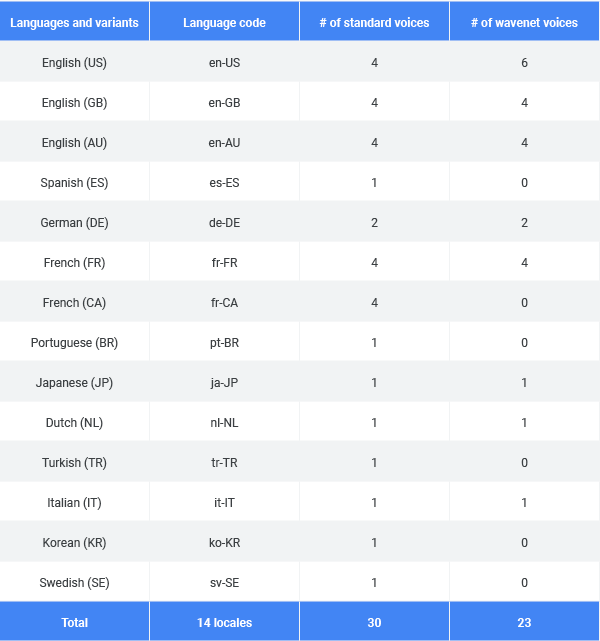
Another interesting new feature here is the beta launch of audio profiles. The idea here is to optimize the audio file for the medium you’ll use to play it. Your phone’s speaker is different from the soundbar underneath your TV, after all. With audio profiles, you can optimize the audio for phone calls, headphones and speakers, for example.

On the Speech-to-Text side, Google is now making it easier for developers to transcribe samples with multiple speakers. Using machine learning, the service can now recognize the different speakers (though you still have to tell it how many speakers there are in a given sample) and it’ll then tag every word with a speaker number. If you have a stereo file of two speakers (maybe a call center agent on the left and the angry customer who called to complain on the right), Google can now use those channels to distinguish between speakers, too.

Also new is support for multiple languages. That’s something Google’s Search App already supports and the company is now making this available to developers, too. Developers can choose up to four languages and the Speech-to-Text API will automatically determine which language is spoken.

And finally, the Speech-to-Text API now also returns word-level confidence scores. That may sound like a minor thing — and it already returned scores for each segment of speech — but Google notes that developers can now use this to build apps that focus on specific words. “For example, if a user inputs ‘please set up a meeting with John for tomorrow at 2PM’ into your app, you can decide to prompt the user to repeat ‘John’ or ‘2PM,’ if either have low confidence, but not to reprompt for ‘please’ even if has low confidence since it’s not critical to that particular sentence,” the team explains.


from TechCrunch https://ift.tt/2NsdT7R
via IFTTT

Comments

Popular posts from this blog

The Silent Revolution of On-Device AI: Why the Cloud Is No Longer King

Introduction For years, artificial intelligence has meant one thing: the cloud. Whether you’re asking ChatGPT a question, editing a photo with AI tools, or getting recommendations on Netflix — those decisions happen on distant servers, not your device. But that’s changing. Thanks to major advances in silicon, model compression, and memory architecture, AI is quietly migrating from giant data centres to the palm of your hand. Your phone, your laptop, your smartwatch — all are becoming AI engines in their own right. It’s a shift that redefines not just how AI works, but who controls it, how private it is, and what it can do for you. This article explores the rise of on-device AI — how it works, why it matters, and why the cloud’s days as the centre of the AI universe might be numbered. What Is On-Device AI? On-device AI refers to machine learning models that run locally on your smartphone, tablet, laptop, or edge device — without needing constant access to the cloud. In practi...

Apple’s AI Push: Everything We Know About Apple Intelligence So Far

Apple’s WWDC 2025 confirmed what many suspected: Apple is finally making a serious leap into artificial intelligence. Dubbed “Apple Intelligence,” the suite of AI-powered tools, enhancements, and integrations marks the company’s biggest software evolution in a decade. But unlike competitors racing to plug AI into everything, Apple is taking a slower, more deliberate approach — one rooted in privacy, on-device processing, and ecosystem synergy. If you’re wondering what Apple Intelligence actually is, how it works, and what it means for your iPhone, iPad, or Mac, you’re in the right place. This article breaks it all down.   What Is Apple Intelligence? Let’s get the terminology clear first. Apple Intelligence isn’t a product — it’s a platform. It’s not just a chatbot. It’s a system-wide integration of generative AI, machine learning, and personal context awareness, embedded across Apple’s OS platforms. Think of it as a foundational AI layer stitched into iOS 18, iPadOS 18, and m...

Max Q: Anomalous

Hello and welcome back to Max Q! Last week wasn’t the most successful for spaceflight missions. We’ll get into that a bit more below. In this issue: First up, a botched launch from Virgin Orbit… …followed by one from ABL Space Systems News from Rocket Lab, World View and more Virgin Orbit’s botched launch highlights shaky financial future After Virgin Orbit’s launch failure last Monday, during which the mission experienced an  “anomaly” that prevented the rocket from reaching orbit, I went back over the company’s financials — and things aren’t looking good. For Virgin Orbit, this year has likely been completely turned on its head. The company was aiming for three launches this year, but everything will remain grounded until the cause of the anomaly has been identified and resolved. It’s unclear how long that will take, but likely at least three months. Add this delay to Virgin’s dwindling cash reserves and you have a foundation that’s suddenly much shakier than before. ...